Free
$0/mo
- Included: Web, Android & iOS apps
- Included: Calendar & website booking
- Included: Clients, projects & reports
- Included: Contracts, invoices & payments
- Included: 10 GB photo galleries
- Included: 2-page website

Built by a working photographer
Run your studio in your browser, with the same account on iPhone, iPad, and Android. Start with Set up with AI when offered, or follow the step-by-step walkthrough.


Every plan includes scheduling, booking, clients, contracts, invoices, and reports. Choose the website and gallery space you need.
$0/mo
$5/moDiscounted price $2.50/mo Regular price $5
All Free features, plus:
$12/moDiscounted price $6/mo Regular price $12
All Free features, plus:
$25/moDiscounted price $12.50/mo Regular price $25
All Free features, plus:
Start free. Pay monthly. Cancel anytime. Prices in USD.
For new and current users who purchase through the website by November 27, 2026. Compare plans and offer details
Clients choose a session type and send a request through your booking page.
Reply from ShootCal or your email to discuss the details.
Accept the request to add the session to your ShootCal calendar and save the client.
Send an invoice or contract with the agreed package and price.
Keep track of the deposit and remaining payments with the job.
Deliver the photos through ShootCal Galleries, with print ordering if you choose to offer it.

I’ve been a professional photographer for almost 20 years. Scheduling clients is one of the most time-consuming parts of the job. For many years I used Fantastical and Google Calendar. I had to look up the sunset time for every date, send the best time to start back to the client, track who had paid a deposit, and much more. So I built ShootCal to automate those exact tasks. This is the scheduling app built by an actual photographer who uses it every day, so I know exactly what features a real photographer needs.
I’ve made countless little tweaks only a photographer would appreciate, from small things like making it easy to copy client names into Lightroom and showing bride and groom names on the Apple Watch widget to glance at during a wedding. To large things like easy-to-sign online wedding contracts and an online availability calendar. As I get more users, please give me feedback if there is anything I missed that you need to make your business better.
Ryan Smith Photography
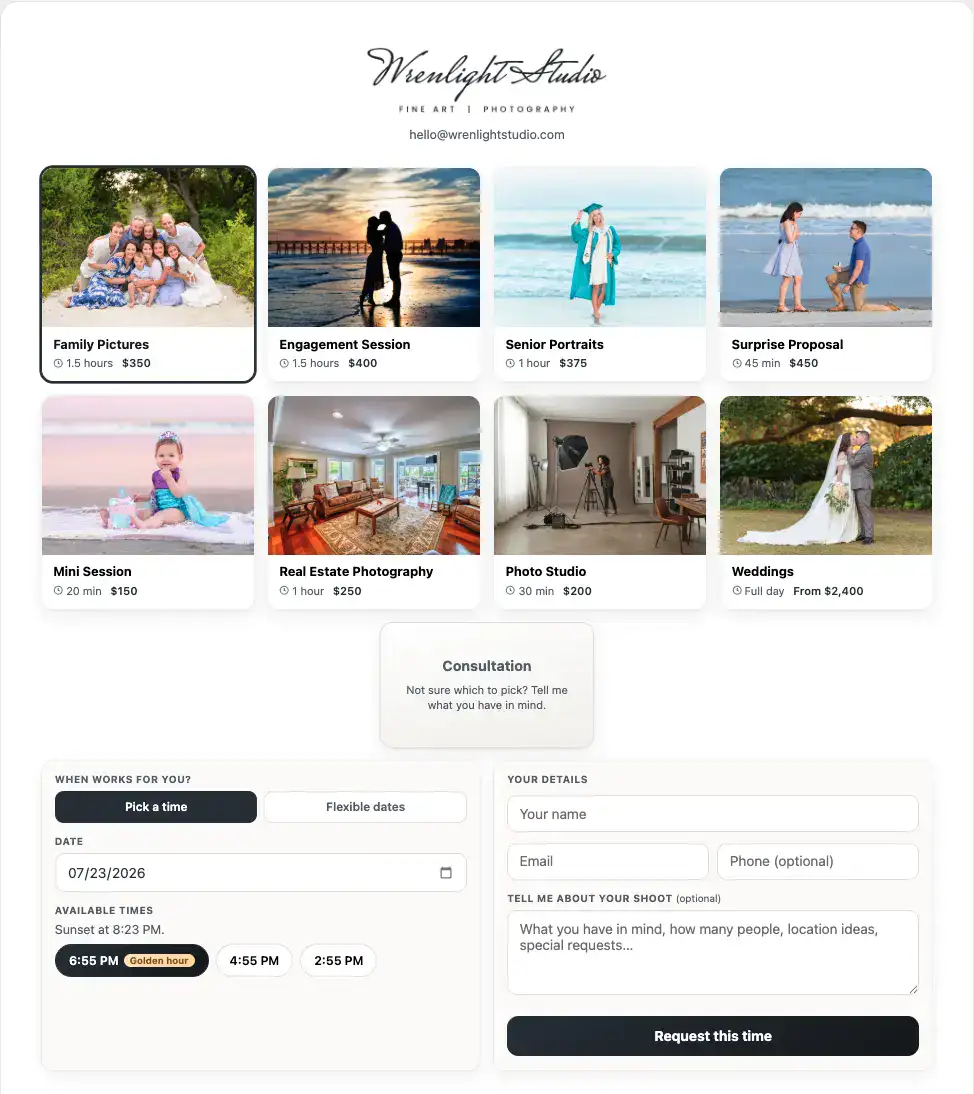
Online booking & availability
Share your booking link or embed it on your website. Clients choose a session type and open date. Sunset sessions suggest a start time for that date. You control each type’s photos, prices, duration, and booking rules.
Accept a request to save the client and session, or enable instant booking for clients to confirm an open time themselves.
The public calendar shows open, limited, and booked days. Client names, locations, and event details stay private. Try the booking page.
Studio management, built in
Keep clients, requests, contracts, invoices, and payments together. Import clients from past calendar events, collect online signatures, and accept payments through your Stripe account. Record cash, checks, and other payments too.
Keep your schedule in ShootCal, with optional Google or Microsoft sync. Client reminders need no calendar connection.


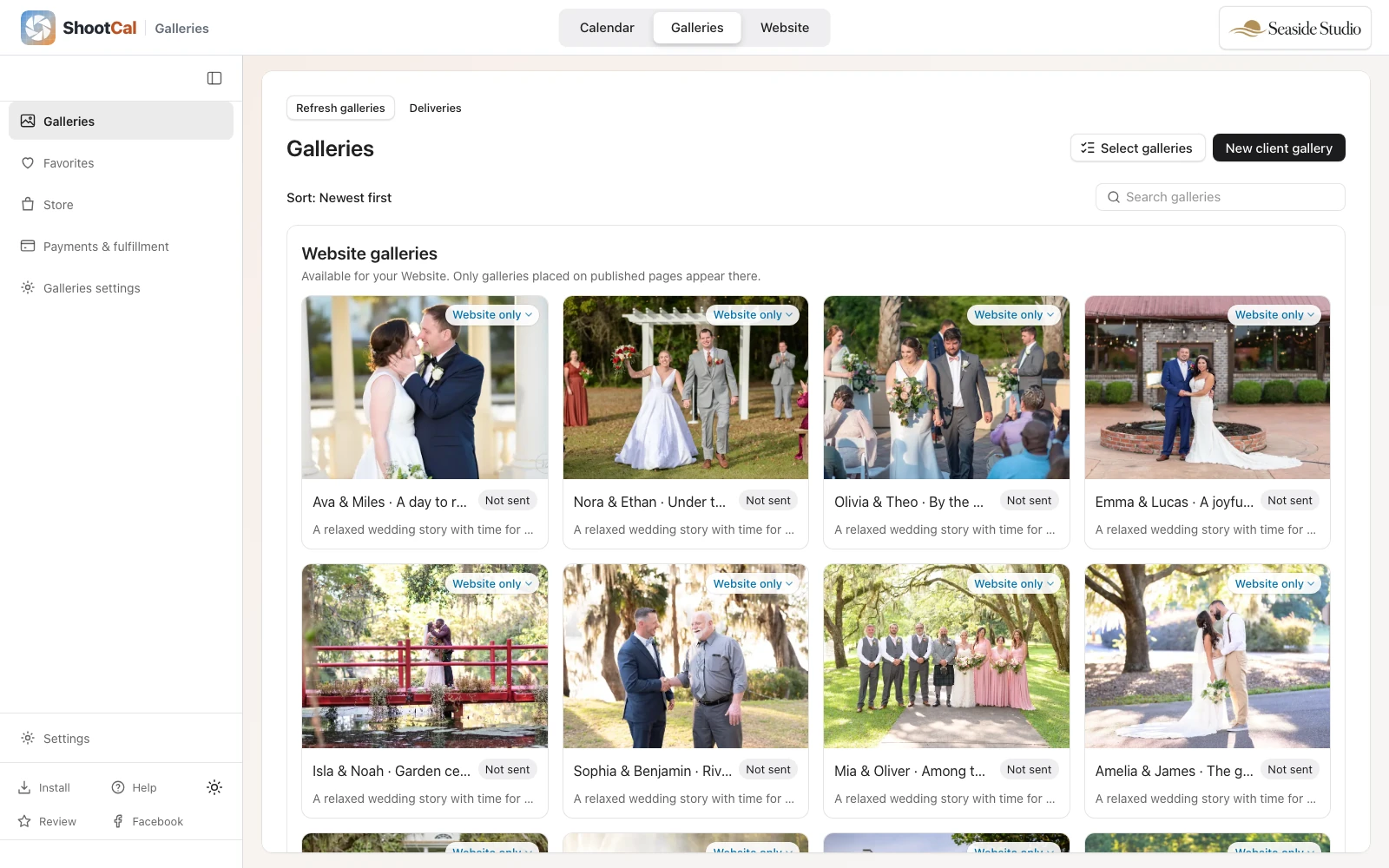
ShootCal Galleries
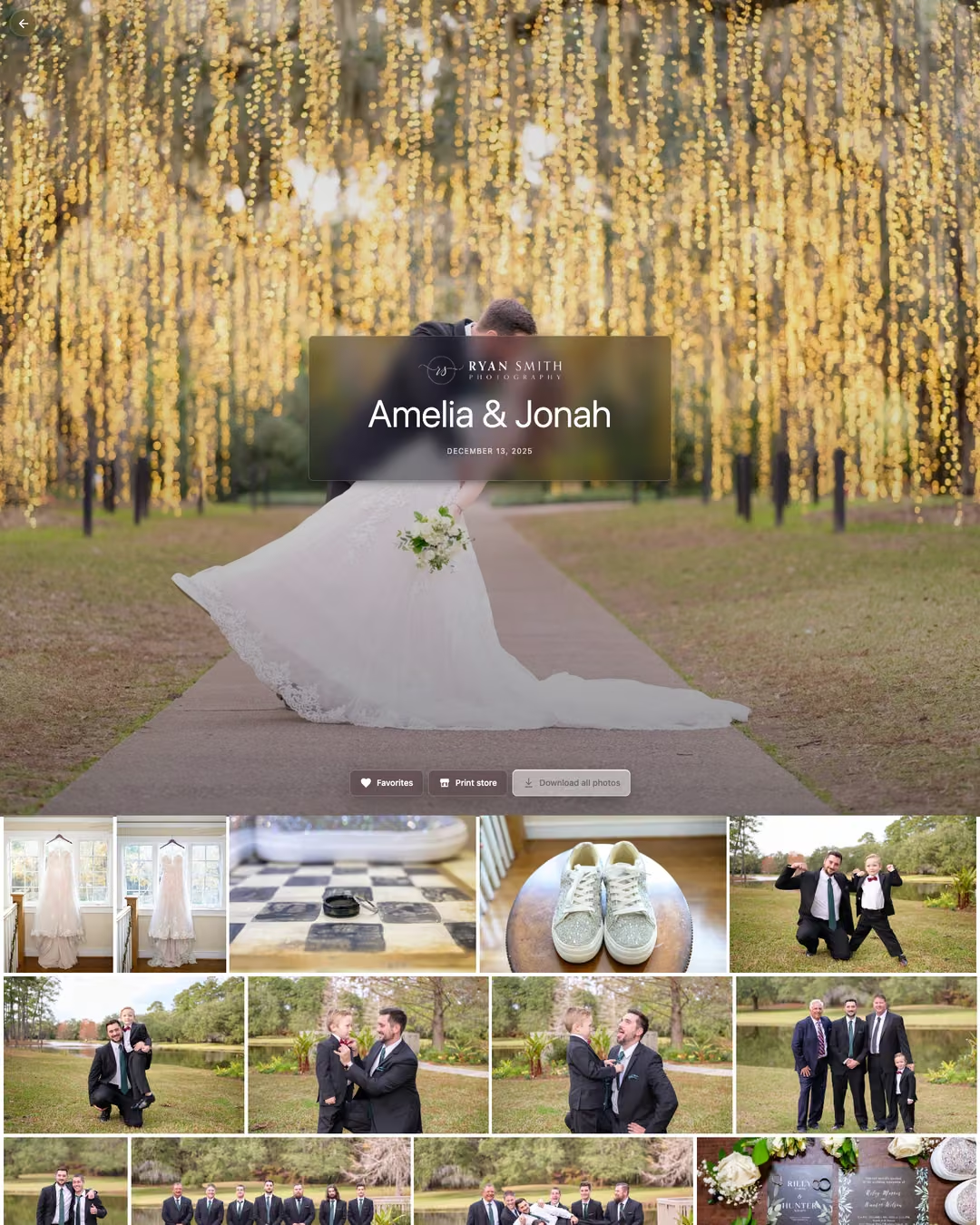
Share photos, collect favorites, and deliver full-resolution downloads through one branded link. Clients need no account.
Publish directly from Lightroom Classic, and offer prints fulfilled by White House Custom Colour. Start with 10 GB free; choose Plus or Pro for video and more storage.
Scheduling
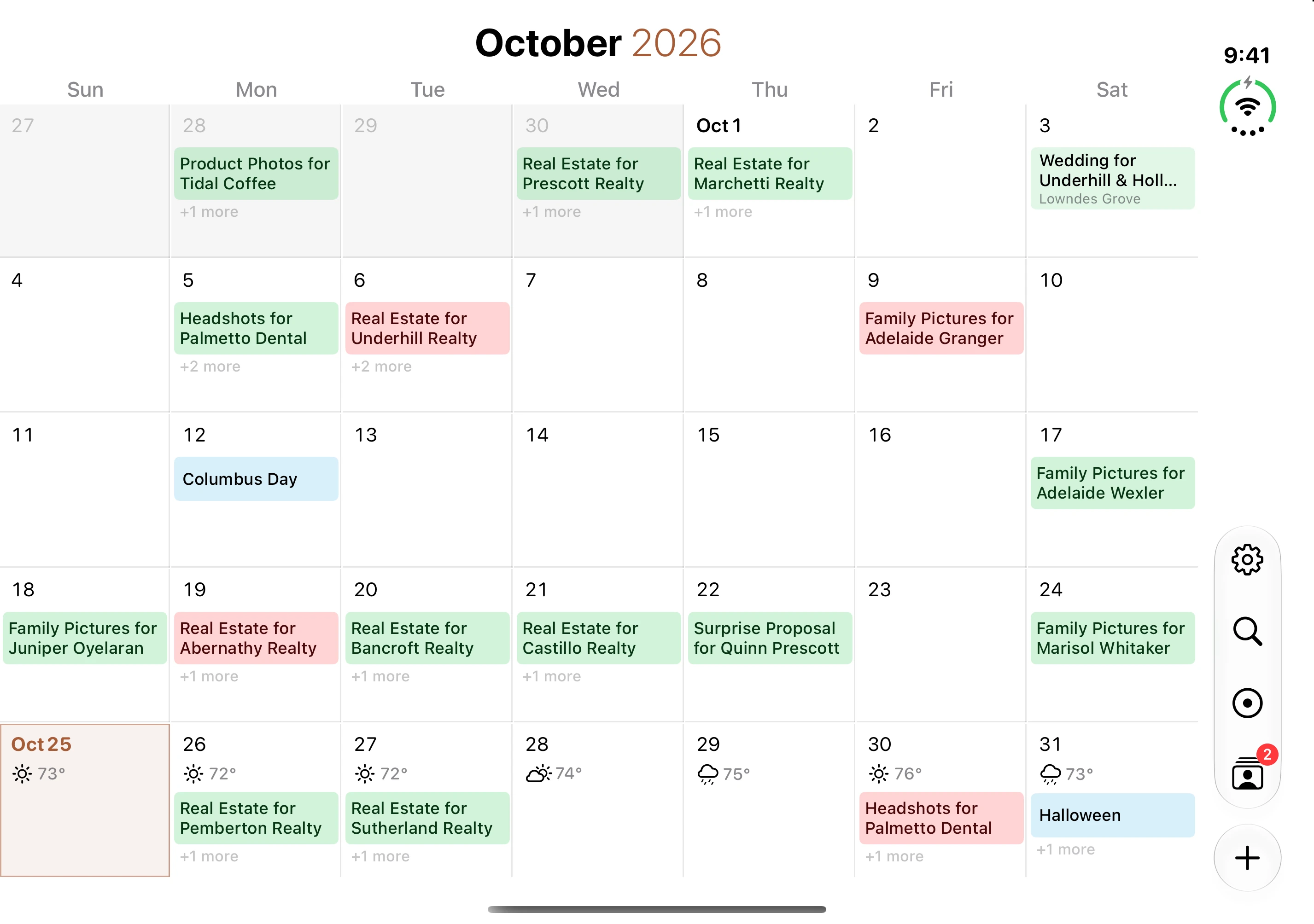
Plan around local sunrise and sunset, with session types that calculate start times. Check available weather, wind, and tide forecasts as the date approaches.
Save each session type’s duration and timing, then reuse those defaults for appointments and booking requests.
Keep appointments in ShootCal or copy them to a selected Google or Microsoft calendar. Review calendar changes when needed. Clients, contracts, invoices, and private notes stay in ShootCal; the calendar copy is not their backup.
Check upcoming clients on your Apple Watch or home screen. The Names Only complication helps you remember the bride and groom’s names during a wedding.
Connect Google or Microsoft through its consent screen without sharing your password. Connection is optional and removable; your appointments stay in ShootCal.
Scheduling and studio tools need no subscription. Every account includes a Free Galleries studio; Plus and Pro are optional.
Using ShootCal in your business? Tell me how it’s working for you, and I’ll feature your review right here on the site.
Prefer to post a public review? Leave a review on Trustpilot
Yes. Scheduling, booking, clients, projects, contracts, invoices, and reports are free, without in-app ads or general in-app analytics. Each account includes 10 GB of free photo delivery; Plus and Pro are optional. Records stay in ShootCal. A connected calendar holds a schedule copy; paperwork and payments have separate exports. To support the platform, please consider a Plus or Pro account if you love it.
Choose sunrise or sunset timing and a session duration; ShootCal calculates the start time for your location and date. Fixed times, studio hours, and all-day sessions are also supported.
Yes, optionally. Connect a provider and choose which calendar to sync appointments to. Changes may need review; pending sync does not confirm provider receipt. Appointments work without a connection. Clients, contracts, and payments stay in ShootCal.
Yes. Open the web app in a modern browser or install it in its own window. Use the same account on iPhone, iPad, and Android. The web workspace needs an internet connection to load records and save changes.
Yes. Turn on your booking page with your session types. Clients choose an open day and, when offered, a time slot. Accept or decline requests in your inbox. Bookings require approval unless you enable instant booking for that type.
Yes. ShootCal’s professional invoices are included at no extra cost. Accept Stripe cards or record Zelle, Cash App, Venmo, check, cash, and custom manual payments; payment and refund history stays with the job and updates its deposit status. ShootCal adds no payment or platform fee to Stripe invoice payments, although Stripe’s standard processing fees still apply.
No. Clients see only open, limited, or booked days. Event titles, locations, and details stay private.
Yes. Every account includes a Free Galleries studio with 10 GB for photos, full-resolution downloads, favorites for proofing, and Lightroom publishing. Optional Plus and Pro plans add more storage and video, with playback up to 1080p and downloads of original files, including 4K. You can also offer prints and wall art produced and shipped by White House Custom Colour (WHCC). Explore ShootCal Galleries
The calendar and studio tools are free, with optional sync to a Google or Microsoft calendar you already use.
Every account also includes a Free Galleries studio. Paid gallery plans are optional.